Distribuition Plataform for Media Files
- UX/UI Design
- Front-End Development
- Python
- HTML / CSS / Javascript
- File System API
- Google Apps Script
At SoftFinança I had a hybrid role combining graphic design, UX/UI and front-end development. Among my graphic design responsibilities was converting advertising posters, originally delivered as PDFs, into motion design animations (MP4) but the process of exporting, organising and sharing those files for client approval was manual, slow and error-prone. Starting from a UX analysis, I redesigned the workflow and built a solution that combines Python automation with a web platform, making the process more efficient, consistent and scalable.
The Problem
Preparing each piece for distribution was almost artisanal work. Each video had to be converted and adjusted individually, according to the requirements of each channel. Files were then renamed following channel-specific conventions and organised into manually created folder structures. Whenever a change request came in, the process had to be repeated practically from scratch.
In total, each request took 30 to 45 minutes to prepare.
The manual file preparation process before automation.
The Solution
To solve this, I started by analysing the entire process and identifying the tasks that consumed the most time and were the most error-prone. Based on that analysis, I redesigned the workflow and built a solution made of a local automation and a web platform, eliminating almost all manual intervention.
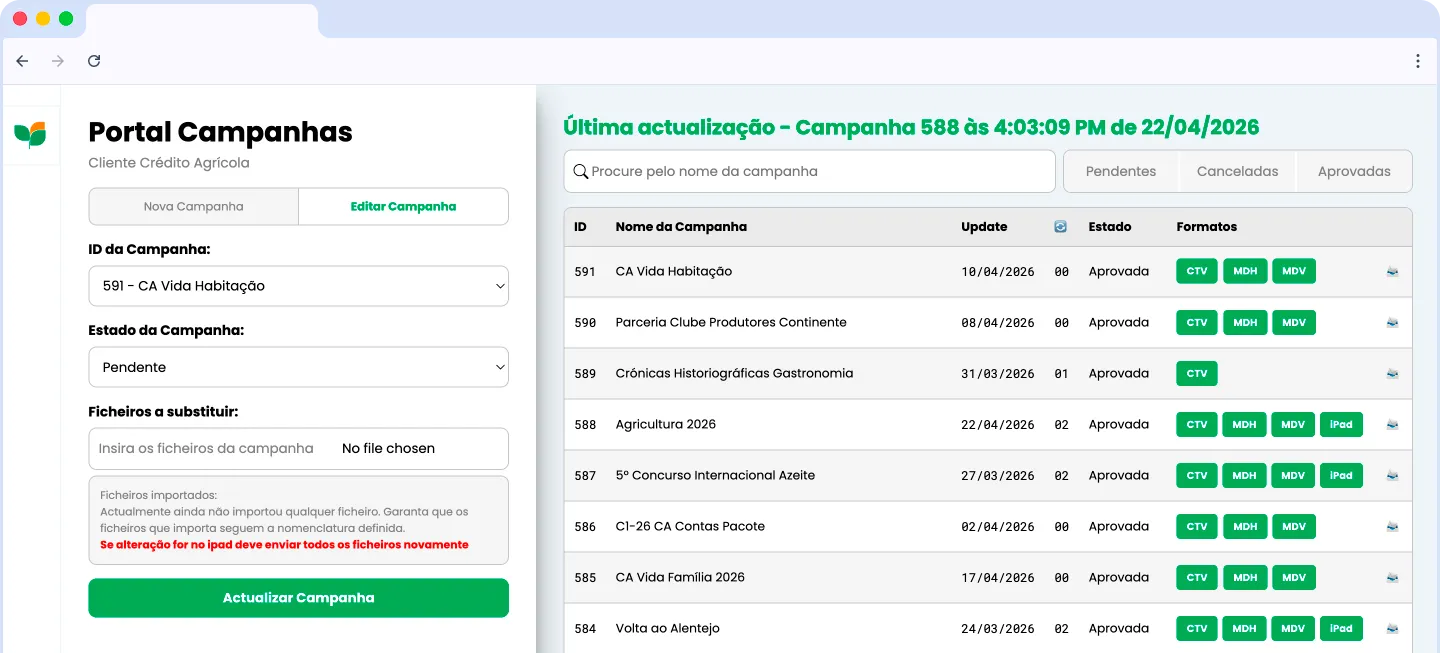
The web platform in action, from file upload to automatic organization.
1. Processing automation
I built a Python script, compatible with Windows and macOS, that batch-processes files and automatically applies the settings required by each distribution channel (via FFmpeg). What used to mean configuring every video by hand became a single automated run.
2. Web platform
I developed a web platform that uses the File System API to create directories, organise files and automatically generate validation links, all directly in the browser, with no backend required.
3. Approval-flow optimisation
I automated email notifications with Google Apps Script and concentrated validation in a single platform. After approval, content is immediately available in its final structure.
The Results

Time reduction
30–45minper request~5minper request−85% time
Error reduction
−90%error rateError reduction based on a comparative analysis of two years of requests
Team adoption
100%
Fully adopted by the team, significantly reducing onboarding time
+300 requestshandled in 2 years
+250 hoursof time savedequivalent to 31 working days
Estimated time saved since implementation, based on the number of requests and the average time per request.
Manual, slow process

Client's PDF content received

Content adapted into video

Individual conversion(per-channel configuration)

Files renamed and .json edited by hand

Directories created and organised manually

Files moved manually after approval

30–45 minper request

Highprobability of human error

Detailed trainingneeded for onboarding
Automated, efficient process

Client's PDF content received

Content adapted into video

Automatic batch conversion(FFmpeg script)

Bulk import into the platform(File System API)

Client notified by email to approve(Google Apps Script)

~5 minper request

−90%errors

Automatedalmost entirely